Intros are hard
Infinite Jest is my white whale. I've tried to read it so many times but I always get stuck. I don't know what it is, loving the book on principle but being humbled by its reality. Relevant to us, though, is it's huge number of footnotes. It's a key feature of the book, where the content of the footnotes sometimes take us the audience on a journey far away from the context of the page that it is pretending to help explain. Indeed, some of the footnotes have their own footnotes.
Used in this way footnotes are funny. I use footnotes mainly to make myself laugh. Unfortunately, as it is my footnotes are at the bottom of my articles1, so the reader is forced to choose between reading all my jokes at the end2, or jumping back and forth3.
Possible solutions
Now, I'm not the only one who uses Zola, and other people have their own qualms with the current footnotes implementation. And due to the beauty of open source4 if a problem bothers you enough you can simply fix it. Take pull request 2480, which added an option for backreferences. This meant readers would be able to jump back from their footnote to the context5:

I still think that's too much jumping. So, what if we just render them inline, next to the next they're "annotating"? A rhetorical question since I've already done this. Here's an old version:
This is okay, but I don't love that it reflows the page. I think a cleaner solution is to use a popup. What might that look like? Also rhetorical, here it is:
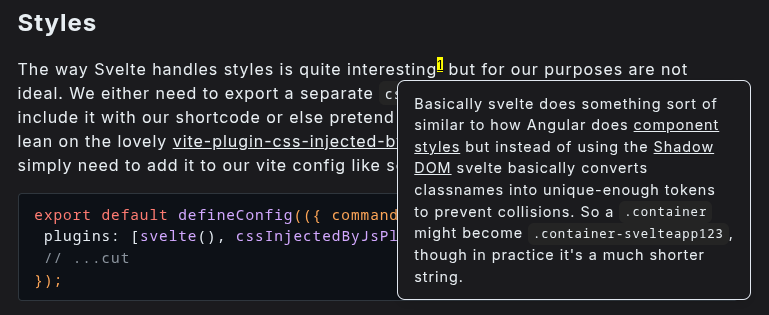
How was this done?
As discussed previously, this site is compiled using a custom version of Zola. Which means I could add this directly to Zola and maybe upstream these changes to the broader community. If it's a good idea why wouldn't people want at least an option for it?
I'm going to make a rule that anything that requires JavaScript is automatically a no-go for broader Zola consumption, and CSS is a maybe. So how can we do this with plain HTML/CSS? My initial gut reaction said it was impossible, but some digging turned up this really interesting work-around:
<p>
  Plain ol' boring basic text

  <span>
    <input type="radio" name="fni" id="fn1">
    <label for="fnri">[1]</label>

    <span>
      A baby puffin is called a puffling
    </span>
  </span>

  Oh my goodness, even more text.
  I wish this was broken up with a funny footnote.

  <span>
    <input type="radio" name="fni" id="fn2">
    <label for="fn2">[2]</label>

    <span>
      A group of puffins is called a circus
    </span>
  </span>.
</p>
This works because both inputs have the same name only one can be active at a time. Then you just add some CSS to only show the footnote as a popup when their associated input is selected, right? Easy-peasy.
Well, yes and no. While this does show footnote popups fine it doesn't actually hide them if you click again or click somewhere else on the page. See, footnotes are like fish: some people just don't like them, and they certainly don't want them cluttering up their blog post with no option to get rid of them.
So I actually think the best option here is to add just a smidgen of JavaScript. I know it goes against the minimalist aesthetic of this website, but hear me out. It's really just a tiny little function, and this whole endeavor is non-functional. If the user disables JavaScript they'll just be left with plain ol' footnotes. It's just this makes them nicer to use.
Here're the relevant parts:
const setup_footnotes = () => {
  const article = document.querySelector("article");
  if (!article) {
    return;
  }

  const footnoteLinks = document.querySelectorAll(".footnote-reference a");
  footnoteLinks.forEach((link) => {
    link.addEventListener("click", function (e) {
      e.preventDefault();

      // Remove any existing footote popup
      document
        .querySelectorAll(".inline-footnote-popup")
        .forEach((p) => p.remove());

      // Grab the footnote
      const targetId = decodeURIComponent(
        link.getAttribute("href").substring(1),
      );
      const targetLi = document.getElementById(targetId);
      if (!targetLi) {
        return;
      }

      // Clone so our changes are non-destructive
      const contentClone = targetLi.cloneNode(true);

      // Strip out the backreference link (the ↩ icon)
      const backRef = contentClone.querySelector(".footnote-backref");
      if (backRef) {
        backRef.remove();
      }

      // Remove the number header
      const label = contentClone.querySelector(".footnote-definition-label");
      if (label) {
        label.remove();
      }

      // Create the popup container
      const popup = document.createElement("div");
      popup.className = "inline-footnote-popup";
      popup.innerHTML = contentClone.innerHTML;

      // Append to article to inherit those styles
      article.appendChild(popup);

      // Position the popup right above or below the clicked element
      const rect = this.getBoundingClientRect();
      let top = rect.bottom + window.scrollY + 8;
      let left = Math.max(10, Math.min(rect.left + window.scrollX - 40, window.innerWidth - popup.offsetWidth - 10));

      popup.style.top = `${top}px`;
      popup.style.left = `${left}px`;

      // Prevent clicking inside the popup from closing it immediately
      popup.addEventListener("click", (e) => e.stopPropagation());
    });
  });

  // Close popups when clicking anywhere else on the screen
  document.addEventListener("click", function (e) {
    if (!e.target.closest(".footnote-reference")) {
      document
        .querySelectorAll(".inline-footnote-popup")
        .forEach((p) => p.remove());
    }
  });
};
The last thing to note is that it's important we mark the associated <script> tag with defer so the script is guaranteed to fire after the document has been fully loaded. Apart from behaving as expected it's slightly better for load times.
Conclusions are hard, too
And that's it. We came up with a number of valid solutions and implemented the one that worked best for our particular needs. I think it looks6 snazzy7.
The foot
Without their original context
Also not a great experience
Majestic 😭
Yummy, yummy context
Spiffy?
Woof